Plan the week. See what it adds up to.
Put breakfast, lunch, dinner and snacks on a calendar. PicyFood adds up the calories, protein, fat and carbs for each day and for the whole week.
Download on theApp Store
Coming soon onGoogle Play
Free to start · Premium unlocks AI Kitchen
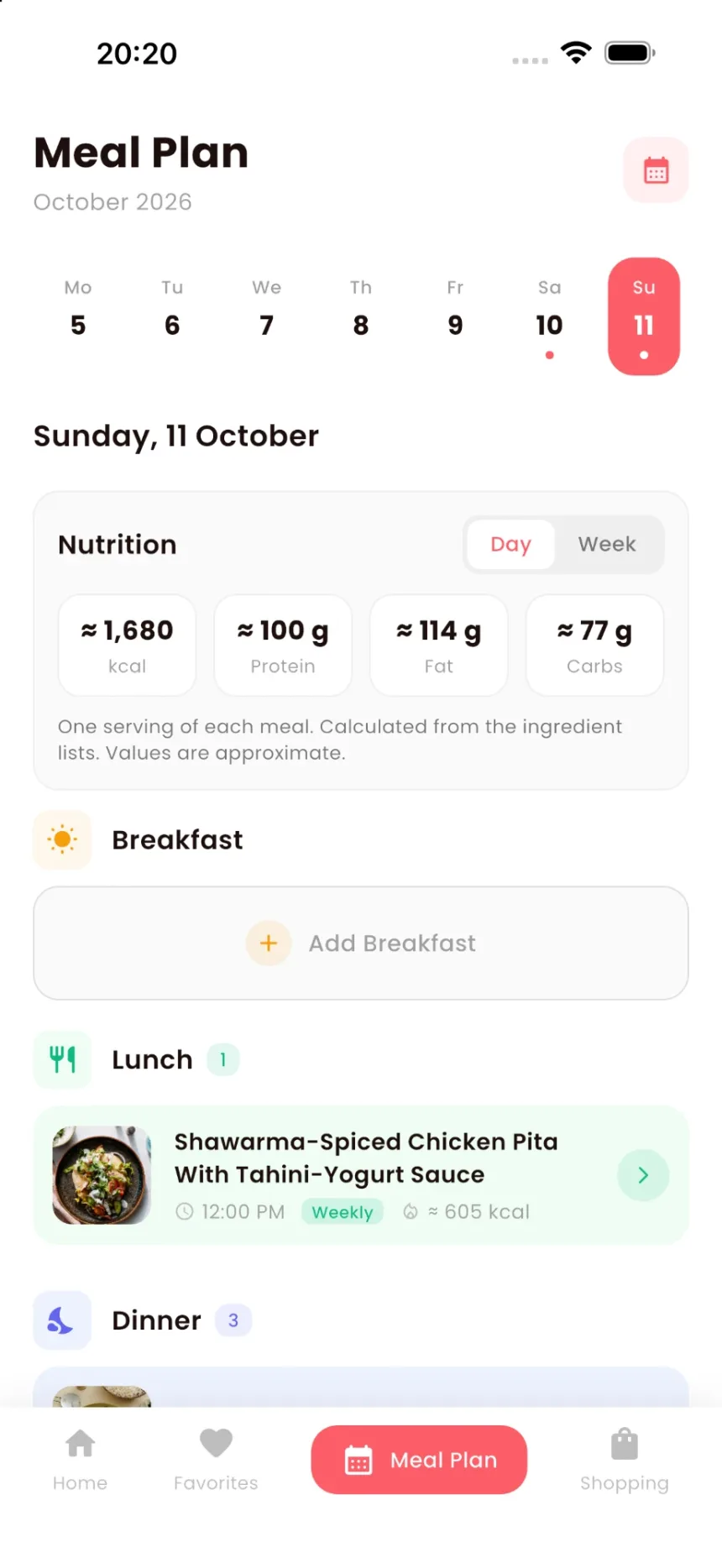
≈ 1,680 kcalplanned for Sunday
≈ 100 gprotein
Your week on one screen
The planner opens on the current week. Tap a day to see everything you plan to eat on it, grouped by meal.
Seven days across the top
A dot marks the days that already have meals on them.
Mo5Tu6We7Th8Fr9Sa10Su11
A slot for every meal
Breakfast, lunch, dinner and snacks. Each can hold more than one dish: dinner takes three recipes as easily as one.
Breakfast
Lunch 1
Dinner 3
Times and repeats
Give a meal a time, and mark the ones you make every week as weekly.
Shawarma-Spiced Chicken Pita With Tahini-Yogurt Sauce12:00 PM Weekly ≈ 605 kcal
Calories and macros for the day or the week
Above the meals, a nutrition card adds up one serving of everything on the plan. Switch it between Day and Week.
An example day from the app: one lunch and three dinner dishes. The totals are estimates, worked out from each recipe's ingredient list.
How nutrition works in PicyFood →NutritionDayWeek
≈ 1,680kcal
≈ 100 gProtein
≈ 114 gFat
≈ 77 gCarbs
One serving of each meal. Calculated from the ingredient lists. Values are approximate.
Adding a meal
2
Tap Add to Meal Plan
The button is on every recipe.
3
Choose the day and the meal
Or start from the plan itself: every empty meal has an add button.
Then shop for all of it
Pick a date range and PicyFood pulls every ingredient from every planned meal into one shopping list, each item labelled with the day it's for.
See the shopping list →This week7 meals · 24 items
Whole grain penneTue
Medium shrimpTue
Cherry tomatoesTue · Fri
Fresh goat cheeseTue
Broccoli rabeThu
Parmigiano-ReggianoThu · Sun
Stop staring into the fridge.
19,985 recipes, a week planner and a shopping list that writes itself.
Download on theApp Store
Coming soon onGoogle Play